Repair Task Creation and Assignment
Core Process
About Repair Task Creation and Assignment
Repair task creation and assignment is the process used to create at least one task for a new request unit and assign it to a person who performs the work.
A request unit is the item you have received for repair. When the request unit is received, a repair tag ID is entered. You use the repair tag ID to find and track the tasks that are created for repair. Repair tags are frequently affixed to the unit for tracking purposes.
Repair tasks are similar to tasks on service requests, with the following differences:
- Repair tasks are always associated with a repair unit
- Repair tasks have a repair tag ID to identify them with a repair unit at a particular point in time. For example, you may repair the same unit multiple times, but each repair instance has a different repair tag ID.
You can use the Request Unit Default Repair Tag Value rule (process 75) to automatically fill the repair tag ID when the unit is received.
Repair Task Creation and Assignment Process Description
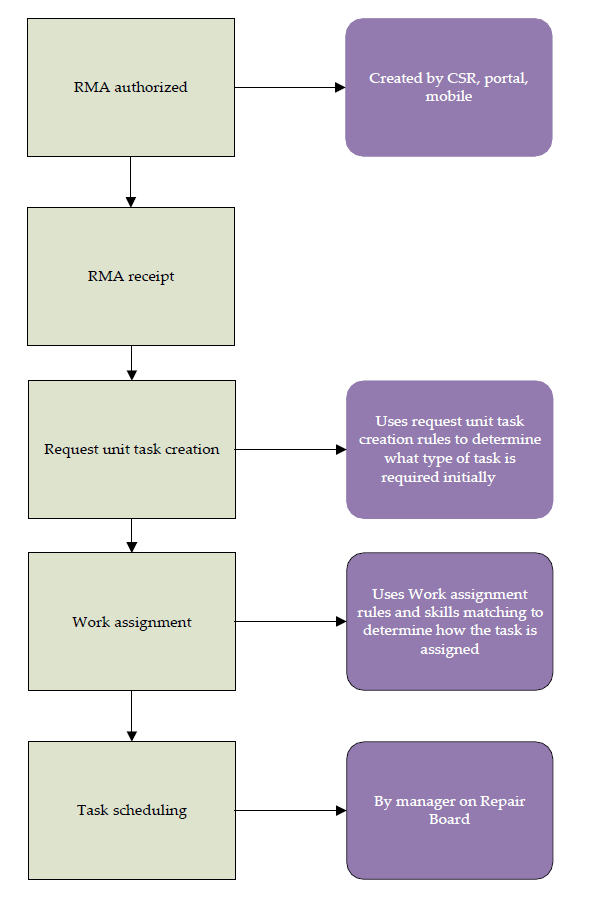
Repair Task Creation and Assignment Process Details
Repair tasks are created by one of the following:
- A single task is created manually
- One or more tasks are created automatically
Repair tasks are assigned by one of the following:
- A single task is manually assigned to a team and person using first available scheduling.
- One or more tasks are automatically assigned to teams
About Manual Assignment
Manual assignment is creating a task and then you select a person to assign to the task. You set up business rules to create the task and perform work assignment. Clicking the Assign button on the Repair Center screen explicitly calls these rules.
Repair Task Creation
Task templates must be created to default certain information on the task, which are required by the Request Unit Task Selection rule (process 74). You set up task templates for the types of work your organization usually performs.
Work Assignment
Assignment is the process of assigning a team and optionally a person to a task. The Work Assignment rule (process 04) is used to perform assignment. If the rule is not set up, or no rule matches the rule inputs, work assignment application parameters are used to create a default assignment.
Rule outputs for the Work Assignment rule (process 04) include a team ID and a person ID. You can do either of the following:
- When you specify a team ID and no person ID, the task is assigned to that team.
- When you specify a team ID and a person ID of @ (at sign), a list of team members and their earliest available time, beginning now, appears. You then select the person ID of the team member you want to assign to the task.
Skill information assists you in selecting the appropriate person. Skills are specified on the Person record and the Place record. Skill levels are compared and the percentage match appears as a score on the Task Assign window.
Persons appear sorted by highest score.
About Automatic Assignment
You can use automatic assignment to always assign a team and person based on information found on the RMA or request unit. The Request Unit Task Set Selection rule (process 93) is used to assign a task set. A task set is a grouping of task templates, and is defined on a code table. Task sets normally contain more than one task template. Using the task set, multiple tasks can be created at once.
When you save a request, using either information on the RMA or the request unit (product), the Request Unit Task Set Selection rule (process 93) performs the following:
- Using information from a task set, creates one or more tasks using the specified task templates.
- For each task, assignment is performed using the Work Assignment rule (process 04).
About Task Succession
Task succession is the automatic creation of one or more new tasks when a task is complete. For example, based on a task status that includes “complete” as one of its attributes, you can automatically follow a repair task with a quality assurance task. You can create one task or all tasks in a task set when you complete either one task or all tasks in a task set. Business rules are used to automate this process based on parameters you specify.
Task succession still creates new tasks after the RMA is closed. You might use this feature to create inspection or repair tasks for an advanced‐replacement unit when it is received.